The task is ready
Customer details, address and the right form come from the back office or a connected system.
For fibre and utility companies
From customer visits and map drawings to signatures, PDFs and messages — the same process, every time.
From task to handover
Connectives follows the work from start to finish. Staff see what the task requires. The rest is handled around the case.
Customer details, address and the right form come from the back office or a connected system.
Forms, annotated photos and map drawings are captured directly on a phone or tablet.
Sign on screen or through a secure link sent by email or SMS.
The PDF is generated in the provider’s branding, and every message can be tracked in the outbox.
The shared foundation
Forms, templates and rules can be configured in the system. When a provider’s requirements change, your workflow does not have to start over.
Field types, sections, conditions and lists are linked to the specific agreement or task type.
Multiple approvers, signing links and completed documentation in the provider’s own branding.
See what was sent, to whom and when — and send it again if something went wrong.
Cadastral maps, drawings, annotated photos and customer uploads collected in one case.
TDC, Pernexus, Energi Fyn, Danish address data and GIS layers where the work requires them.
Availability, booking links and calendar synchronisation without double bookings.
Two editions. One platform.
Lite and Pro share forms, documentation, integrations and a mobile app. The difference is whether each job stands alone or forms part of a larger workflow.
For companies where each agreement stands alone: a visit, a form, a signature and a finished PDF.
For projects with dependent tasks, different contractors and an overview of progress.
Moving from Lite to Pro adds capabilities — not a new way of working.
The same forms, templates and integrations remain familiar.
The Connectives app · For Lite and Pro
The app is built for consultants and technicians working at customer sites. On a phone or tablet, you have the day’s visits, customer details and documentation at your fingertips.
One app for both editions. Work with agreements in Lite and tasks in Pro. The app automatically recognises the installation it connects to.
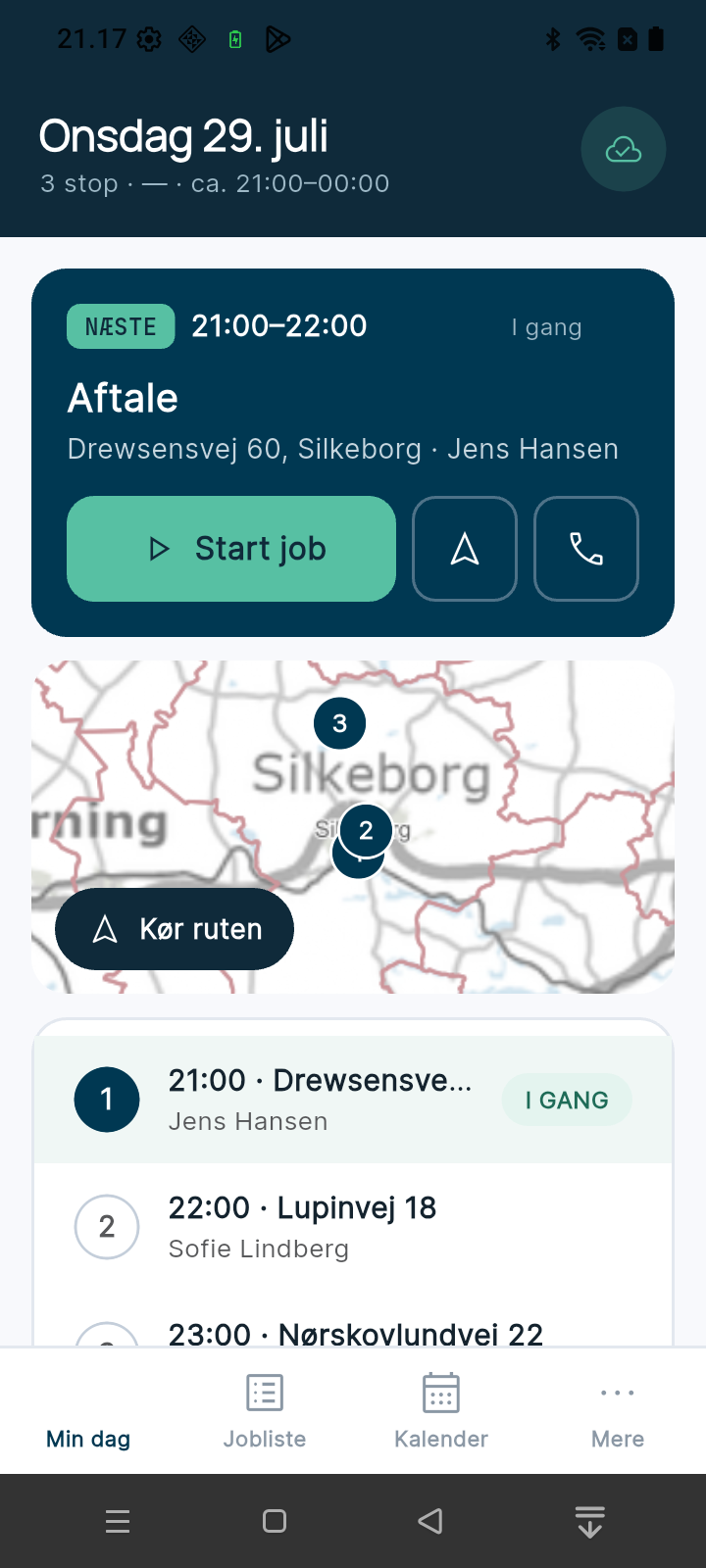
See the next visit, today’s stops and addresses on the map. Start the job, open navigation or call the customer directly from your daily overview.
Search the job list by name, address or ID, and filter by status. The calendar brings your bookings together so you can see what is coming up.
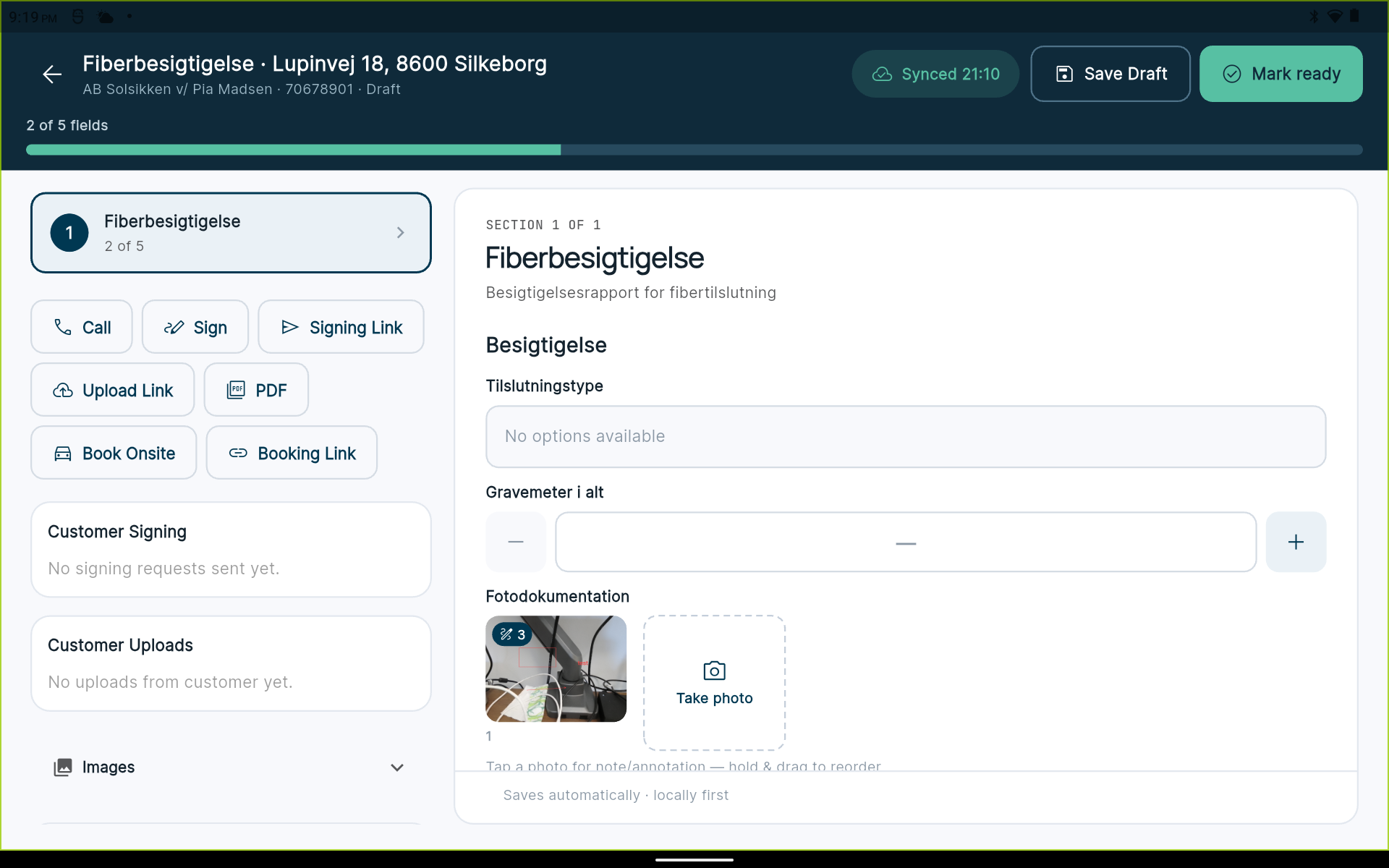
Complete the form, take photos and add notes. Save a draft, track form completion and mark the work ready once the documentation is in place.
Collect a signature on site, send a signing or upload link, open the PDF and book a visit from the case.
See the latest sync, pending changes and any conflicts in the app. Connect to your organisation using a QR code or your portal’s domain.
Our approach
We have no marketing department and no sales department. You talk to the people who write the code — and who will implement what we agree on.
See how we workValue means a job taking four minutes instead of twenty — not a system with the longest feature list.
Small improvements go live, get measured and are followed by the next. That makes change manageable.
AI handles the mechanical work. People make the decisions about architecture and workflows.
Connectives by LK Group
A working draft beats a pitch deck. We start by understanding the workflow that needs to become simpler.
Tell us about your work and what you would like to make simpler.
(+45) 7026 0099info@lkgroup.dkDanish business registration (CVR): 38732102